SMS Opt-In
Last updated: November 3, 2026
Aximus Labs Order Texts is operated by Deepak Prakash, doing business as Aximus Labs. We send transactional texts only: confirmations to callers and new-order, booking and catering request alerts to restaurant owners and staff. No marketing or promotional texts. Every text starts with "Aximus Labs:" and says how to opt out.
There are three ways to opt in. Each one is shown below exactly as people see or hear it.
1. Verbal consent on a call (restaurant callers)
When someone calls a restaurant that uses Aximus Labs, the assistant says at the start of the call that it is an AI assistant. After the caller's order, table booking or catering request is confirmed, and before the call ends, the assistant reads this script word for word:
Script: "Can Aximus Labs text you a confirmation of this order? Message and data rates may apply. Yes or no?"
Only the words "this order" change to match what was confirmed: "this booking", "this booking request" (large groups), "this catering request", or a combination such as "this order and booking". The text goes to the number the caller is calling from, or to the number they gave if there is no caller ID.
- A text is sent only after the caller says "yes".
- If the caller says no, or still gives no clear answer after the question is repeated once, no text is sent.
- The answer is recorded in the call transcript and in our consent log.
Example of the text a caller receives: "Aximus Labs: Your pickup order at [Restaurant Name] is confirmed. [Qty]x [Item]. Total $[Total]. Ready ~[Time]. Pickup at [Address]. Reply STOP to opt out."
2. Website sign-up form (restaurant owners and staff)
Restaurant owners sign up at https://aximuslabs.com/#demo. Below the phone field is an optional checkbox. It is unchecked by default and the form can be submitted without it. Its label reads:
Checkbox: "I agree to receive transactional SMS from Aximus Labs about new orders and bookings for my restaurant. Message and data rates may apply. Message frequency varies. Reply STOP to opt out, HELP for help."
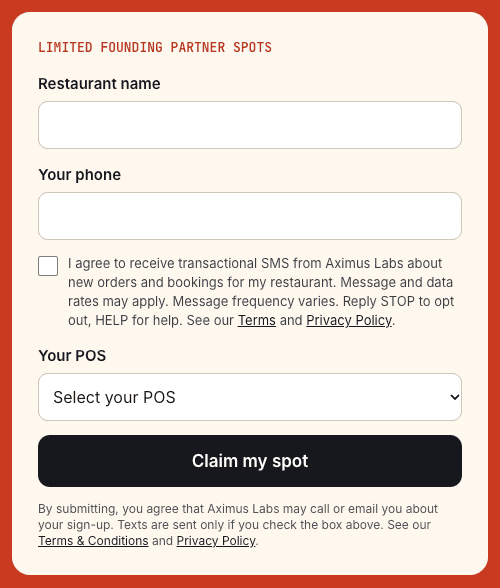
When the box is checked, the opt-in, its exact wording and the time are stored. Alerts start once that number is added to the owner's restaurant in the dashboard (method 3).
3. Restaurant dashboard (restaurant owners and staff)
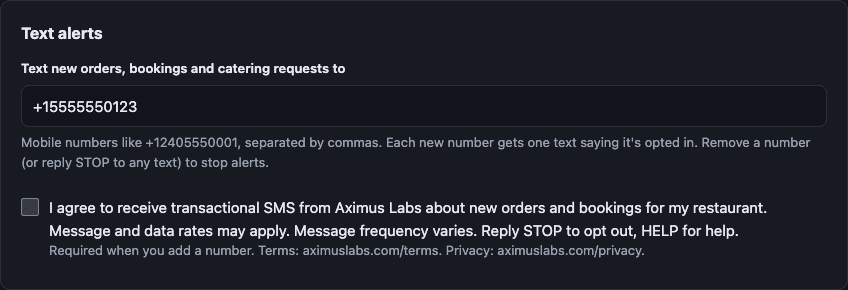
In their restaurant dashboard, owners add mobile numbers under "Text alerts". A number can only be saved when the same optional, unchecked consent box is checked. The opt-in is stored, and only numbers added this way receive alerts.
After an owner opts in (method 2 or 3), the first text is: "Aximus Labs: You're opted in to receive order texts. Msg & data rates may apply. Msg frequency varies. Reply STOP to cancel, HELP for help."
Example alert: "Aximus Labs: New pickup order for [Restaurant Name]. [Customer Name], [Phone]. [Qty]x [Item]. Total $[Total]. Pickup ~[Time]. Reply STOP to opt out."
4. Opting out and help
- Reply STOP (or STOPALL, UNSUBSCRIBE, CANCEL, END, QUIT) to any message to opt out. You will receive one confirmation and no further texts.
- Reply HELP for help, or email hello@aximuslabs.com.
- Message frequency varies. Message and data rates may apply. Consent is not a condition of any purchase.
Full SMS terms: https://aximuslabs.com/terms. Privacy Policy: https://aximuslabs.com/privacy.